
Subscription & Billing
Subscription & Billing
Manage your MakersFuel subscription, understand the different plans, and handle billing matters.
How Pricing Works
MakersFuel is free to use. The platform -- ideas, community, MakerLink, networking, and messaging -- costs nothing.
The only paid feature is AI Employees. Pricing depends on the claw type and storage tier you choose.
What's Free
| Feature | Cost |
|---|---|
| Startup Ideas (full library) | Free |
| MakerLink (founder page) | Free |
| Makers Directory | Free |
| Direct Messages | Free |
| Networking & Connections | Free |
AI Employee Pricing
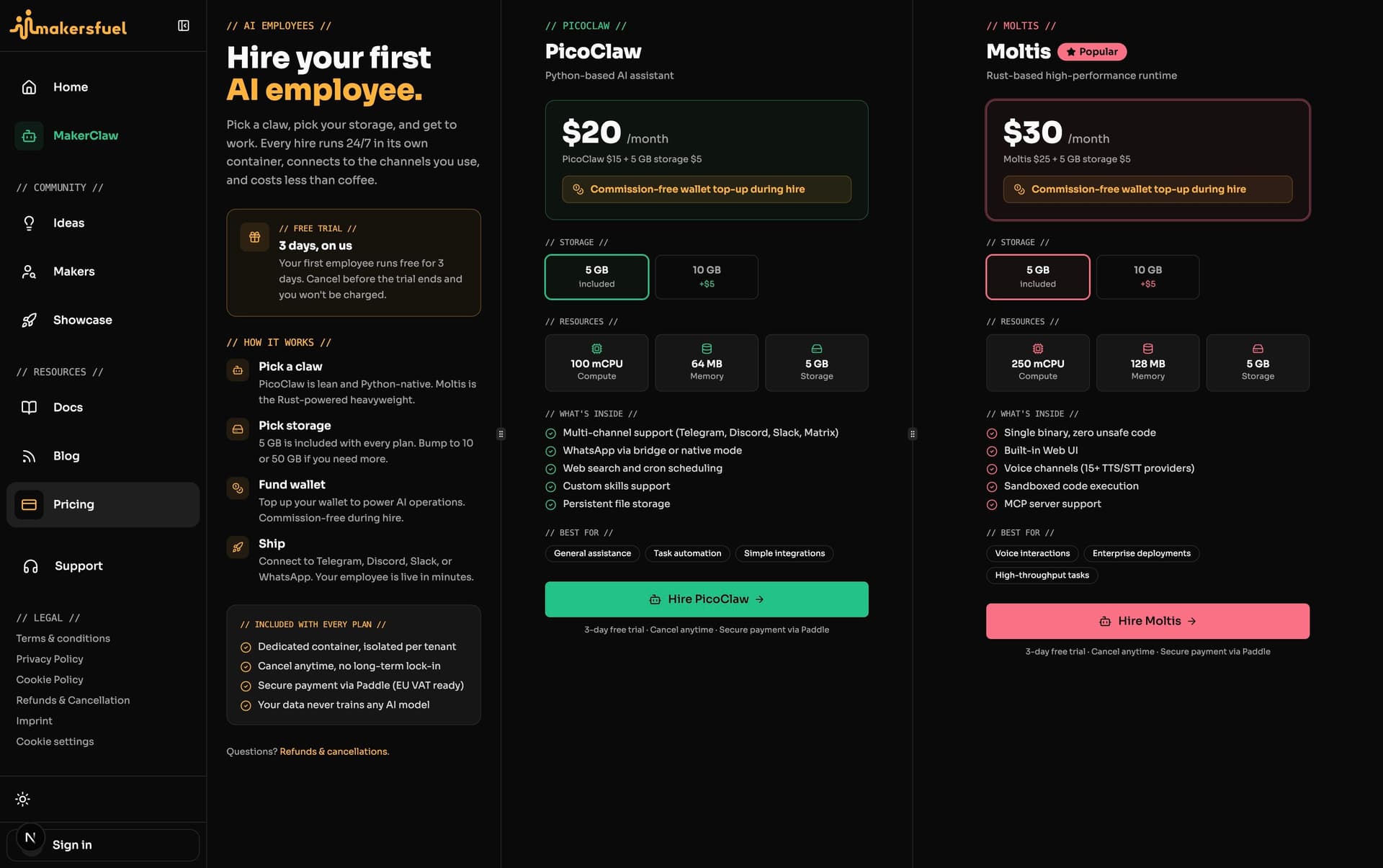
Each AI employee has two cost components: compute (the claw type) and storage.
Claw Types
| Claw Type | Compute Cost | Description |
|---|---|---|
| PicoClaw | $15/month | Lightweight AI agent |
| Moltis | $25/month | Full-featured AI agent with web UI |
Storage Tiers
| Storage | Cost |
|---|---|
| 5 GB | $5/month |
| 10 GB | $10/month |
Total Monthly Cost
| Configuration | Monthly Cost |
|---|---|
| PicoClaw + 5 GB storage | $20/month (minimum) |
| PicoClaw + 10 GB storage | $25/month |
| Moltis + 5 GB storage | $30/month (minimum) |
| Moltis + 10 GB storage | $35/month |
Billing Details
| Detail | Info |
|---|---|
| Billing cycle | Monthly only (no yearly option) |
| Payment | Credit card or PayPal via Paddle |
| Per-employee billing | Each employee has its own subscription |
| Cancel | Anytime -- employee continues until the billing period ends |
Free Trial
Your first employee only gets a 3-day free trial. Subsequent employees begin billing immediately.
During the free trial:
- Full access to the employee and all its features
- Cancel before 3 days to avoid any charges
- A $1 wallet gift is added to your Assistiv wallet so you can test AI usage immediately
Wallet
Your AI employees are powered by an Assistiv AI wallet. The wallet holds a USD balance that funds your employees' AI usage (model calls, token consumption).
Managing Your Wallet
- Click avatar at bottom of left sidebar, then select Settings
- Go to Wallet
- View your current balance
- Top up via Paddle (credit card or PayPal)
Your wallet balance is separate from employee subscriptions. The subscription covers hiring the employee; the wallet funds the AI model usage that powers it.
Wallet Top-up Commission
| Top-up Method | Commission |
|---|---|
| During employee hire flow | 0% (commission-free) |
| Standalone wallet top-up (from Settings) | 5% processing fee |
Managing Your Subscription
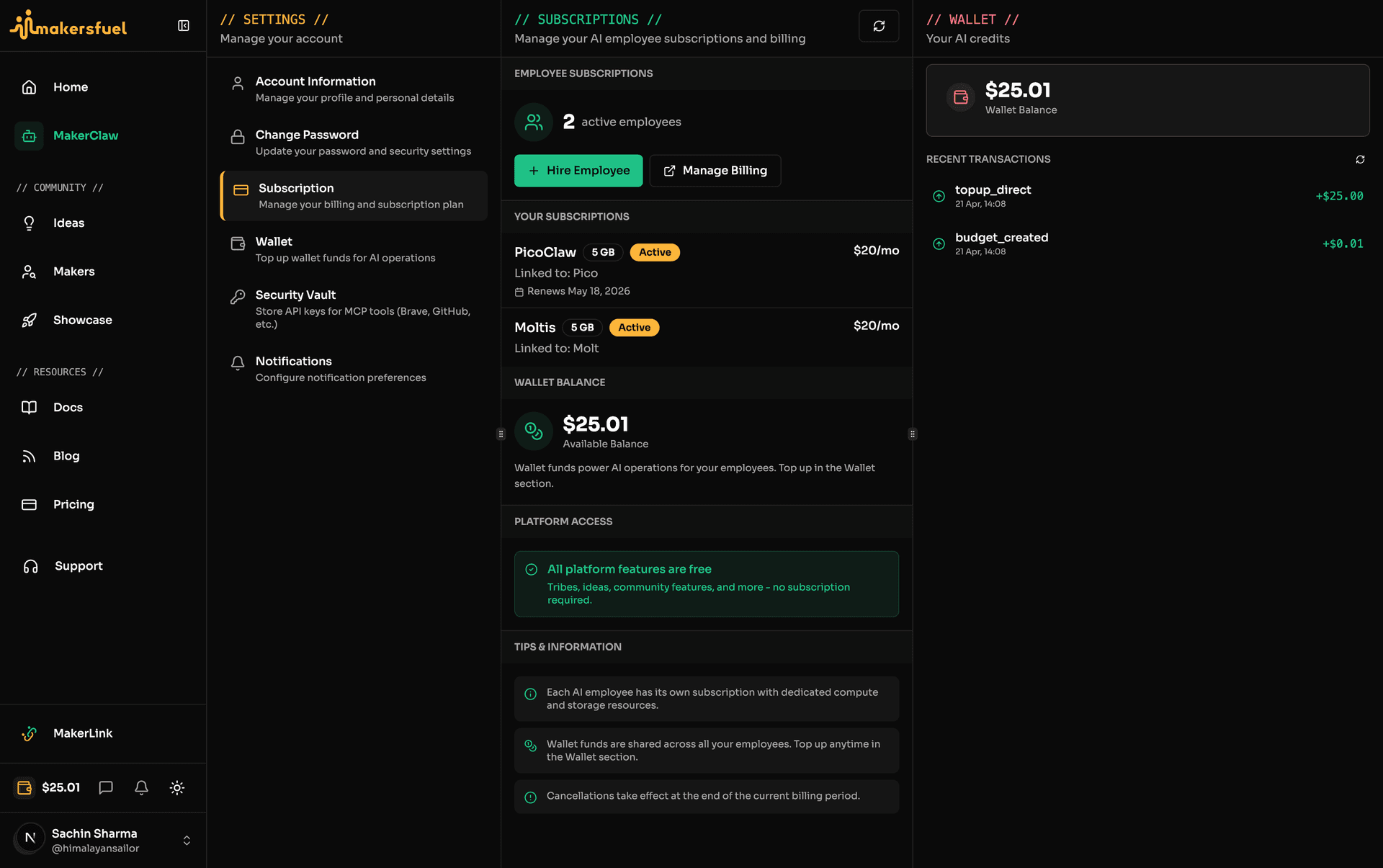
Viewing Your Subscriptions
- Click avatar at bottom of left sidebar, then select Settings
- Click Subscription
- See each employee's subscription details:
- Employee name and type
- Renewal date
- Subscription status
Canceling an Employee Subscription
To cancel an employee subscription:
- Go to Settings -> Subscription
- Find the employee
- Click Cancel Subscription
- Confirm cancellation
What happens:
| After Cancellation | Details |
|---|---|
| Employee continues | Until billing period ends |
| No future charges | Immediately |
| Employee terminates | At period end |
| Your data remains | Connections, ideas, etc. |
Payment & Billing
Payment Methods
Handled securely via Paddle:
- Credit/debit cards
- PayPal
- Regional methods (varies by location)
Invoices
Access invoices:
- Go to Settings -> Billing
- Click Manage Subscription
- View invoice history in Paddle portal
Failed Payments
If payment fails:
- You'll be notified via email
- Grace period provided (varies)
- Update payment method to continue
- Account may be restricted if unresolved
Employee Subscriptions
How They Work
Each AI employee has its own independent subscription:
- Hire your first employee and start a 3-day free trial (first employee only)
- After the trial (or immediately for subsequent employees), billing begins
- Cancel any individual employee without affecting others
- Terminated employees free up resources but don't require canceling other subscriptions
Canceling Impact
When you cancel an employee subscription:
- The employee continues running until the billing period ends
- No further charges for that employee
- You can hire a new employee anytime
- Your platform access (ideas, messages, MakerLink) is unaffected
Frequently Asked Questions
What happens if I cancel an employee?
The employee continues running until your current billing period ends, then is terminated. You can hire a new employee anytime.
Can I get a refund?
Refund policies are handled by Paddle. Contact support for specific cases.
Is my payment information secure?
Yes. Payments are processed by Paddle, a certified payment provider. MakersFuel never sees your card details.
Is the platform free?
Yes. Ideas, MakerLink, messaging, and networking are all free. You only pay for AI employees.
How does the free trial work?
Your first AI employee comes with a 3-day free trial plus a $1 wallet gift. You can try the employee before being charged. If you cancel during the trial, you won't be billed. Subsequent employees do not include a free trial.
Is there a yearly billing option?
No. All employee subscriptions are billed monthly only.
Getting Help
For billing issues:
- Check Settings -> Billing for status
- Use the Support chat (bottom right)
- Email support with your account details
Next Steps
- Account Settings -- Manage your account
- MakerLink -- Your founder page
What did you think of this content?