

Makers Directory
Makers Directory, Profiles & Showcase
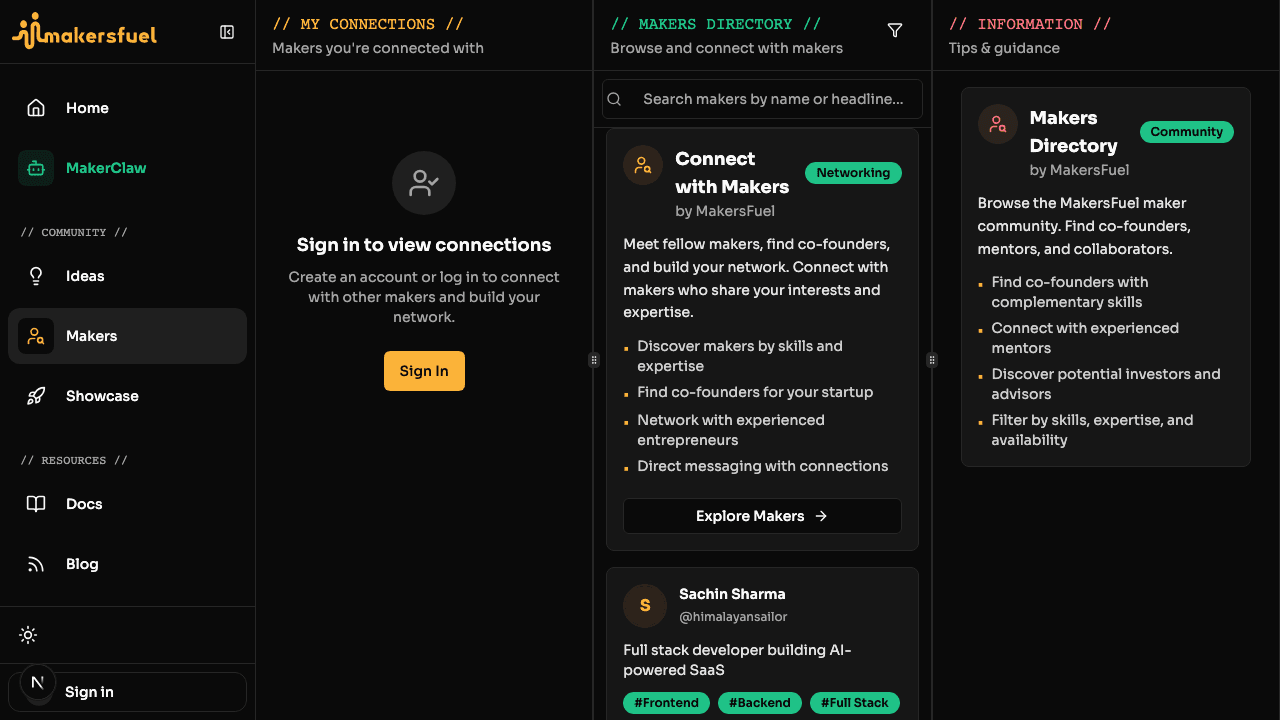
The Makers Directory is where you discover other builders, showcase your startups, and find collaborators. This guide covers browsing the directory, creating your Maker Profile, adding startups, and connecting with other makers.
Makers Directory
Browse all maker profiles at /makers.
The directory lists every maker who has created a profile. You can:
- Filter by skills, expertise, looking for, and availability
- Search by name or headline
- Click any card to view a full profile
If you haven't created a profile yet, the directory shows a call-to-action prompting you to set one up.
Creating Your Maker Profile
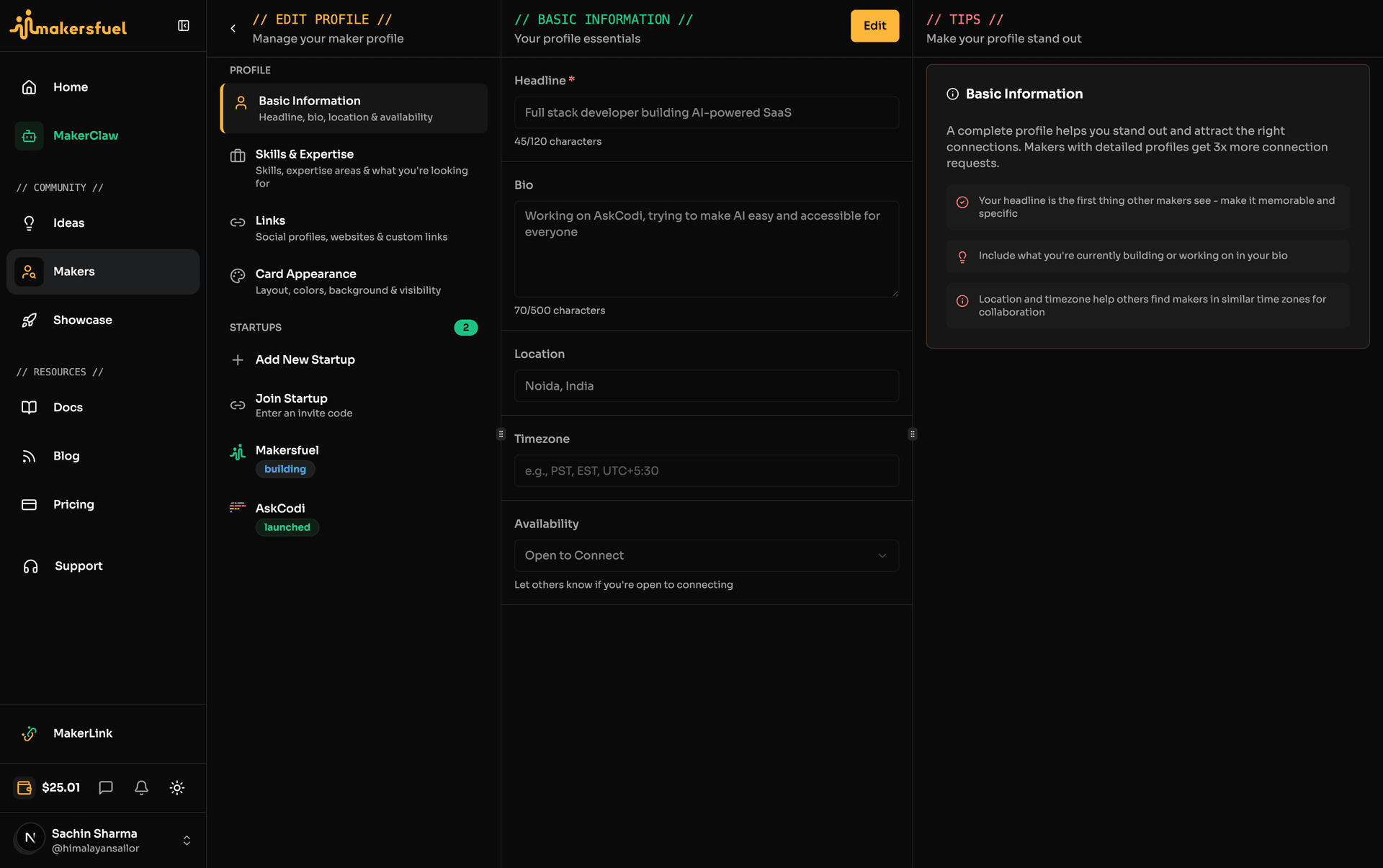
Head to /makers/edit to create or update your profile. The editor uses a 3-column layout: navigation on the left, content in the center, and contextual tips on the right.
Basic Info
| Field | Details |
|---|---|
| Headline | A short tagline describing what you do (max 120 characters) |
| Bio | A longer description of your background and interests (max 500 characters) |
| Location | City, country, or "Remote" |
| Timezone | Your working timezone |
| Availability | Open (actively networking), Limited (selective), or Closed (not taking new connections) |
Skills & Expertise
Select all that apply from predefined lists.
Skills: Frontend, Backend, Full Stack, Mobile, DevOps, Design, Product, Marketing, Sales, Data Science, AI/ML, Blockchain, Content, Growth.
Expertise: SaaS, E-commerce, Fintech, HealthTech, EdTech, Social Media, Marketplace, Enterprise, Consumer Apps, Developer Tools, AI/ML, Blockchain/Web3, Gaming, Hardware, IoT.
Looking For: Co-maker, Technical Co-maker, Designer, Mentor, Investor, Developer, Marketer, Advisor, Team Member, Feedback.
Links
Your profile supports three types of links:
- Social icons -- Twitter, LinkedIn, Instagram, Threads, TikTok, YouTube
- Platform link buttons -- GitHub, Website, ProductHunt, Dev.to, Medium, Substack, Dribbble, Behance, Figma, Discord, Calendly
- Custom links -- Add any URL with a user-defined label
Adding Startups
You can add startups from the profile editor at /makers/edit or directly via /showcase?action=add-startup.
Startup Fields
| Field | Details |
|---|---|
| Name | Your startup's name |
| Tagline | Short pitch (max 150 characters) |
| Description | What the startup does |
| Logo | Upload a logo image |
| Website URL | Link to the live product or landing page |
| Stage | Idea, Building, Launched, or Scaling |
| Category | Primary category |
| Industry tags | Relevant industries |
| Funding status | Bootstrapped, Pre-seed, Seed, Series A, Series B+, or Profitable |
| Team size | Number of team members |
| Tech stack | Technologies used |
| Social links | Startup-specific social profiles |
| Pitch deck URL | Link to your pitch deck |
Edit Sub-Sections
The startup editor is divided into seven sections: Company, Category & Stage, Team & Tech, Maker, Progress, Idea, and Equity.
Co-Founder Invites
You can invite co-founders in two ways:
- Direct invite -- Send an invite to a specific maker on the platform
- Invite code -- Generate a 7-day invite code that anyone can use to join
Startups you add appear on your MakerLink profile and in the Showcase directory.
Showcase Directory
The platform-wide startup directory lives at /showcase.
It uses a 3-column layout: a startup list on the left, section navigation in the center, and a startup detail panel on the right. All visible startups are listed here regardless of tribe membership.
Individual startup pages are available at /showcase/[slug].
Note: The Showcase directory is separate from tribe-level showcases. Tribe showcases are scoped to that tribe's members, while /showcase is platform-wide.Connecting with Makers
Sending a Request
- Visit a maker's profile page
- Click the Connect button
- Include a message with your request
- The maker receives a notification
Responding to Requests
When you receive a connection request, you can Accept or Decline it from your notifications.
Connection Statuses
| Status | Meaning |
|---|---|
| Pending | Request sent, waiting for a response |
| Accepted | Mutual connection established |
| Declined | Request was turned down |
| Blocked | Connection blocked |
What Connections Unlock
Once connected with another maker, you can:
- Send direct messages
- See their activity in your feed
- View their full profile details
Viewing a Profile
Maker profiles are accessible at /makers/[username]. A profile page displays:
- Bio, headline, and location
- Skills and expertise tags
- Startups and showcase entries
- Social and platform links
- Connect and Message buttons
Next Steps
- Direct Messaging -- Communicate with your connections
- Tribes -- Join community groups and collaborate
What did you think of this content?